
Remove Privacy Protector adware
Privacy Protector is classified as adware, a type of software designed primarily to generate revenue through advertising rather than provide meaningful functionality to the user. Although it may be presented as a useful browser extension or tool, its actual behavior raises concerns related to performance, privacy, and overall browsing safety.
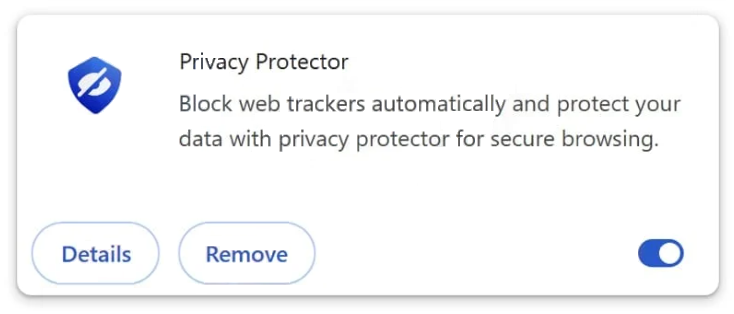
Once installed, Privacy Protector typically begins displaying a variety of intrusive advertisements. These can appear as pop-ups, banners, in-text links, or redirects that interrupt normal browsing activity. The ads are not merely an inconvenience, as they often promote questionable websites, misleading offers, or downloads that may introduce additional unwanted software. In some cases, interacting with these ads can even lead to further infections or scams.
A noticeable symptom of this adware is a decline in browser performance. Users may experience slower page loading times, unresponsive tabs, or pages that do not render correctly. This happens because the adware continuously injects advertising content and communicates with external servers, consuming system resources in the background.
Beyond advertising, Privacy Protector may also engage in data tracking activities. Like many ad-supported programs, it can monitor browsing behavior to gather information such as visited websites, search queries, and clicked links. This data is valuable for targeted advertising, as it allows developers or associated third parties to tailor ads based on user interests. However, it also introduces privacy risks, particularly if the collected information is shared or sold without proper transparency.
In certain cases, the application may exhibit behavior similar to a browser hijacker. This means it can interfere with browser settings, such as modifying search preferences or redirecting users to specific pages. These changes may be difficult to reverse while the adware remains installed, further reinforcing its control over the browsing environment.
Although Privacy Protector is not typically categorized as severe malware, it still represents a security concern. Adware sits in a gray area between legitimate software and malicious threats—it may not directly damage files, but it can expose users to harmful content, degrade system performance, and compromise personal data. Because of these risks, security experts generally recommend removing such applications as soon as they are detected.
How Privacy Protector spreads and how to avoid it
Privacy Protector is rarely installed intentionally. Instead, it is usually distributed through deceptive installation methods that rely on user inattention or misleading content. One of the most common techniques is software bundling, where adware is included alongside free programs downloaded from the internet.
When users install free software from unofficial or third-party sources, the setup package may contain additional components that are not immediately obvious. These extra programs are often hidden within installation steps and pre-selected by default. If users choose standard installation modes—such as “Quick” or “Recommended”—they may unknowingly approve the installation of Privacy Protector along with the intended software.
Another frequent distribution method involves misleading advertisements and fake alerts. Users may encounter pop-ups claiming that their browser is outdated, their system is at risk, or that they need a tool to enhance privacy or security. These messages are designed to appear legitimate, but clicking them can trigger the download or installation of adware instead of a genuine solution.
Untrusted download sources also play a significant role in spreading unwanted applications. Peer-to-peer (P2P) networks, torrent websites, and unofficial app stores often host modified installers that include bundled adware. Because these sources are not regulated, there is a higher risk of downloading software that has been altered to include additional unwanted components.
To avoid installing programs like Privacy Protector, users should adopt more cautious habits when downloading and installing software. Applications should always be obtained from official websites or reputable platforms, where the likelihood of bundled content is significantly lower. During installation, selecting “Custom” or “Advanced” settings allows users to review all included components and decline anything unnecessary.
It is equally important to remain skeptical of unexpected pop-ups, ads, or warnings encountered while browsing. Legitimate security notifications do not appear as random web advertisements urging immediate action. Avoiding interaction with such messages can prevent accidental downloads of unwanted software.
Maintaining a secure system environment also helps reduce risk. Keeping the operating system and browser updated ensures that known vulnerabilities are patched, while reliable security tools can detect and block suspicious applications before they become active.
In essence, Privacy Protector spreads through deception rather than direct exploitation. By paying attention during installations, avoiding unreliable sources, and treating online advertisements with caution, users can significantly reduce the chances of encountering adware and similar unwanted programs.
Remove Privacy Protector adware
Adware infections can be tricky to get rid of manually, so using an anti-virus program like WiperSoft is strongly recommended. When the adware is no longer present, the browser should return to normal.
Site Disclaimer
WiperSoft.com is not sponsored, affiliated, linked to or owned by malware developers or distributors that are referred to in this article. The article does NOT endorse or promote malicious programs. The intention behind it is to present useful information that will help users to detect and eliminate malware from their computer by using WiperSoft and/or the manual removal guide.
The article should only be used for educational purposes. If you follow the instructions provided in the article, you agree to be bound by this disclaimer. We do not guarantee that the article will aid you in completely removing the malware from your PC. Malicious programs are constantly developing, which is why it is not always easy or possible to clean the computer by using only the manual removal guide.