
Remove “Account Security Notification” scam email
The “Account Security Notification” email scam is a phishing message that pretends to be a legitimate alert from an email or online service provider. It falsely informs recipients that a new login or suspicious sign-in activity has been detected on their account. While the message may appear official and reassuring, it is actually designed to trick users into giving away their login credentials.
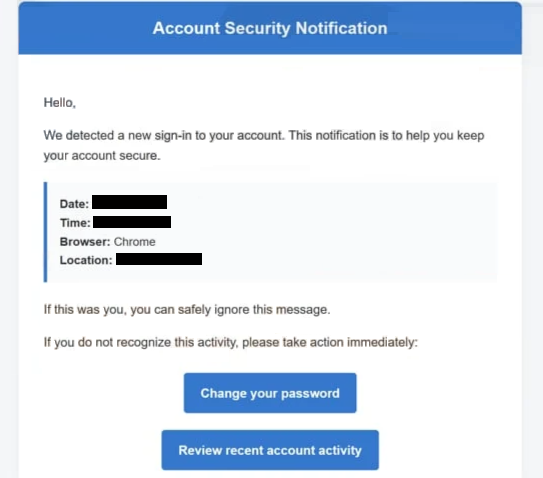
The email usually includes details meant to make the alert look authentic. For example, it may mention a login time, browser type, or geographic location where the activity supposedly occurred. These details are fabricated and serve only to increase credibility and create concern.
To prompt action, the message often includes buttons or links labeled with phrases such as “Change your password” or “Review account activity.” Clicking these links does not lead to a real service provider. Instead, users are redirected to a fraudulent website that mimics a legitimate login page.
On these fake pages, victims are asked to enter their email address and password. Any information entered is immediately captured by the attackers. Once scammers obtain these credentials, they can access the victim’s email account and use it for various malicious purposes.
Compromised accounts can be misused in several ways. Attackers may read private messages to gather sensitive data, send phishing emails to contacts, or attempt to access other accounts linked to the same email address. In more serious cases, stolen credentials can be used for identity theft, financial fraud, or spreading malware.
It is important to understand that legitimate companies do not ask users to secure their accounts through unsolicited email links. Real security alerts typically advise users to log in through official websites or apps rather than clicking embedded links in emails. Messages that create urgency and request immediate action should always be treated with caution.
How this scam spreads and how to avoid it
The “Account Security Notification” scam is distributed mainly through mass spam campaigns. Cybercriminals send large volumes of emails to random recipients, hoping that some will trust the message and follow its instructions.
To make the emails more convincing, attackers often use spoofed sender addresses that appear to belong to trusted companies. The message may look professional and include familiar branding, but small inconsistencies—such as unusual domain names—can reveal that it is fraudulent.
A key tactic used in this scam is creating urgency and fear. By claiming that an unknown login has occurred, the email pressures recipients to act quickly to “secure” their accounts. This reduces the likelihood that users will carefully examine the message before clicking links or entering information.
In some cases, phishing emails may also include attachments or redirect users through multiple websites before reaching the final fake login page. These techniques help scammers avoid detection and make the attack appear more legitimate. Additionally, similar phishing campaigns may be used to distribute malicious files disguised as documents or system alerts.
Avoiding this scam requires a cautious approach to unexpected messages. One of the most effective steps is to avoid clicking links in emails that claim account issues, especially if the message was not expected. Instead, users should open a browser and navigate directly to the official website of the service to check for real notifications.
It is also important to carefully inspect the sender’s email address. Even if the display name looks legitimate, the actual address may reveal that it is not associated with the claimed company. Any mismatch should be treated as a warning sign.
Enabling two-factor authentication (2FA) adds an extra layer of protection. Even if attackers obtain login credentials, they may not be able to access the account without the additional verification step. Using strong, unique passwords for each account further reduces the risk of widespread compromise.
Keeping software updated and using reliable security tools can also help detect phishing websites and block malicious links before they cause harm. Many modern browsers and antivirus programs include built-in protections against known phishing pages.
Site Disclaimer
WiperSoft.com is not sponsored, affiliated, linked to or owned by malware developers or distributors that are referred to in this article. The article does NOT endorse or promote malicious programs. The intention behind it is to present useful information that will help users to detect and eliminate malware from their computer by using WiperSoft and/or the manual removal guide.
The article should only be used for educational purposes. If you follow the instructions provided in the article, you agree to be bound by this disclaimer. We do not guarantee that the article will aid you in completely removing the malware from your PC. Malicious programs are constantly developing, which is why it is not always easy or possible to clean the computer by using only the manual removal guide.