
Remove “Pending Configuration Verification” email scam
The “Pending Configuration Verification” email scam is a phishing attempt that falsely claims there is an issue with the recipient’s email account settings. The message typically states that a routine system check has been completed and that the account is now pending verification, which must be resolved to avoid service interruptions. In reality, this email is fraudulent and is not connected to any legitimate email provider or support team.
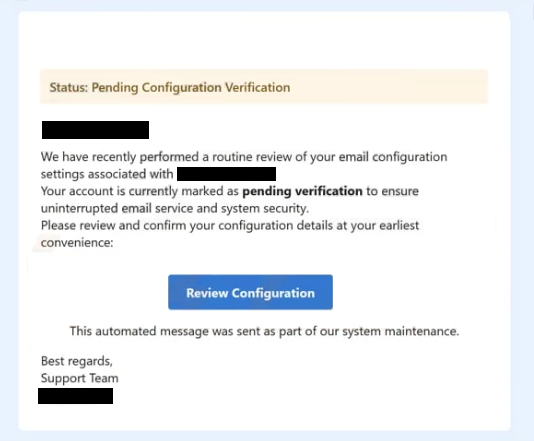
The main purpose of this scam is to trick recipients into revealing their email login credentials. To achieve this, the message includes a link—often labeled something like “Review Configuration” or “Verify Settings.” When clicked, this link redirects the user to a fake login page designed to closely resemble a real email service such as Gmail or Yahoo.
These phishing pages are often tailored to look convincing, sometimes adapting their appearance based on the victim’s email domain. Once the victim enters their email address and password, the information is captured and sent directly to the scammers. From that point, attackers can gain unauthorized access to the email account and use it for various malicious purposes.
A compromised email account can lead to serious consequences. Cybercriminals may search through messages to collect sensitive data, use the account to send further phishing emails, or attempt to access other linked services such as banking, social media, or online shopping platforms. Because many people reuse passwords, gaining access to one account can open the door to several others.
In addition to data theft, attackers may use hijacked accounts to impersonate the victim. They can send fraudulent messages to contacts, request money, or distribute malicious links and attachments. In more severe cases, stolen information can be used for identity theft or financial fraud.
It is important to emphasize that the claims made in these emails are entirely false. Legitimate service providers do not send unsolicited messages asking users to verify account settings through external links. Messages that create urgency and request immediate action should always be treated with caution, especially when they involve sensitive information.
How this phishing scam spreads and how to avoid it
The “Pending Configuration Verification” scam is typically distributed through large-scale spam campaigns. Cybercriminals send thousands of emails at once, hoping that some recipients will trust the message and follow its instructions. These campaigns are inexpensive to run and can be highly effective due to the use of social engineering techniques.
To increase credibility, scammers often disguise the email as an official notification from a support team or system administrator. The message may include professional formatting, technical language, and references to routine maintenance or security checks. This makes it appear legitimate, even though it is entirely fabricated.
A key tactic used in these scams is creating urgency. The email may warn that failure to verify the account could result in service disruptions, restricted access, or data issues. This pressure encourages recipients to act quickly without carefully checking whether the message is genuine. Similar phishing schemes often use nearly identical strategies, such as claiming configuration errors or account verification requirements, to lure victims into revealing credentials.
In some cases, phishing emails may also include attachments or links that lead to additional threats. While the primary goal is usually credential theft, these campaigns can sometimes be used to distribute malware if users download or open malicious files.
Avoiding scams like this requires a cautious and deliberate approach to email security. One of the most effective steps is to avoid clicking links in unexpected emails, especially those requesting account verification or login details. Instead, users should access their accounts directly through official websites by typing the address into their browser.
It is also important to examine the sender’s email address carefully. Fraudulent messages often come from domains that look similar to legitimate ones but contain subtle differences or misspellings. Any inconsistency should be treated as a warning sign.
Using strong, unique passwords for each account and enabling two-factor authentication (2FA) can significantly reduce the risk of account compromise. Even if credentials are stolen, 2FA can help prevent unauthorized access. Regularly monitoring account activity can also help detect suspicious behavior early.
Keeping software and security tools updated adds another layer of protection. Many modern security solutions can detect phishing websites and block access before sensitive information is entered.
In summary, the “Pending Configuration Verification” email scam relies on deception and urgency to trick users into exposing their credentials. By recognizing the warning signs—unexpected verification requests, suspicious links, and pressure to act quickly—users can effectively protect themselves from this type of phishing attack.
Site Disclaimer
WiperSoft.com is not sponsored, affiliated, linked to or owned by malware developers or distributors that are referred to in this article. The article does NOT endorse or promote malicious programs. The intention behind it is to present useful information that will help users to detect and eliminate malware from their computer by using WiperSoft and/or the manual removal guide.
The article should only be used for educational purposes. If you follow the instructions provided in the article, you agree to be bound by this disclaimer. We do not guarantee that the article will aid you in completely removing the malware from your PC. Malicious programs are constantly developing, which is why it is not always easy or possible to clean the computer by using only the manual removal guide.