
Remove Pulse Browser potentially unwanted program
Pulse browser is a Chromium-based web browser that is promoted as a tool with additional features such as integrated artificial intelligence capabilities and enhanced browsing functionality. However, security researchers have determined that it falls into the category of a potentially unwanted application (PUA) due to the way it behaves after installation and the risks it may pose to users.
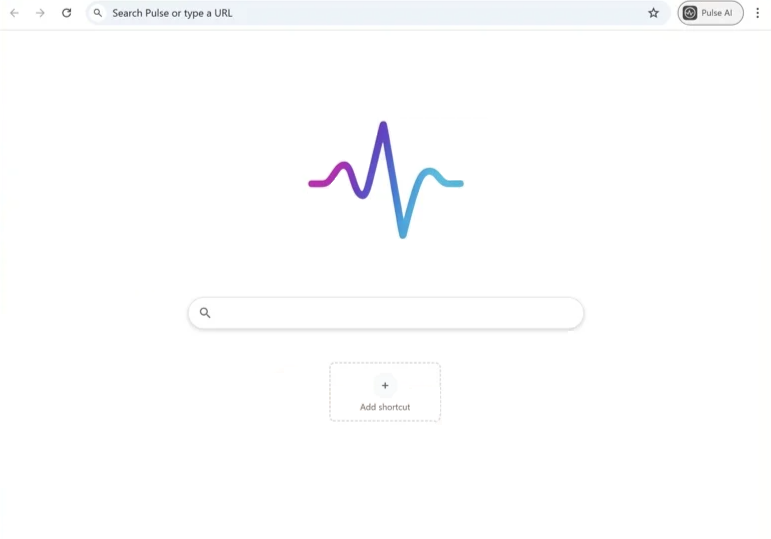
Although it may appear to be a legitimate browser at first glance, Pulse Browser can perform actions that raise security and privacy concerns. One of the most common issues reported by users is that the browser redirects searches to questionable or fake search engines that are unable to generate their own results. Instead of providing independent search results, these engines may forward queries to other search providers while inserting advertisements or tracking data along the way.
Programs classified as potentially unwanted often exhibit behaviors that negatively affect the user’s browsing experience. For example, they may alter browser settings without clearly informing the user or may install additional components that interfere with normal browsing activities. In the case of Pulse Browser, users may notice that search results behave differently than expected, or that certain pages redirect them to other websites before displaying results.
These redirects are typically used to generate advertising revenue. By forcing users to visit specific pages or search services, the developers behind the application can increase traffic to affiliated websites. This traffic can generate profit through pay-per-click advertising systems or other marketing partnerships. However, such behavior can also expose users to unreliable or misleading websites that promote scams, suspicious downloads, or additional potentially unwanted software.
Another reason Pulse Browser is considered a PUA is the possibility of data tracking. Many applications in this category monitor browsing activity in order to gather information that can be used for advertising purposes. The collected data may include browsing history, search queries, IP addresses, and other technical details about the device or browser being used. In some cases, this information can be shared with third parties such as advertising networks or marketing companies.
While Pulse Browser is not always categorized as high-risk malware, its presence on a system can still create problems. The application may reduce browsing efficiency, display unwanted content, or redirect users to websites that contain misleading advertisements or harmful downloads. Because of these behaviors, cybersecurity researchers typically recommend removing such applications from affected systems and returning to trusted browsers installed from official sources.
Potentially unwanted programs like Pulse Browser represent a growing category of software that sits somewhere between legitimate applications and traditional malware. These programs are often designed to appear helpful while still carrying out activities that benefit their developers rather than the user. As a result, many antivirus and security tools detect them as suspicious software and warn users about their installation.
How Pulse Browser gets installed and how to avoid it
Applications like Pulse Browser rarely rely on direct downloads alone. Instead, they commonly spread through deceptive software distribution techniques, particularly software bundling. Bundling occurs when additional programs are packaged together with legitimate software so that they are installed simultaneously. When users download free programs from unofficial sources, the installer may include several optional components, including unwanted applications.
In many cases, these extra programs are hidden within the installation process. The installer may present them as recommended tools or additional features that are already pre-selected. If users choose the “Quick” or “Express” installation option, the bundled applications may be installed automatically without any additional confirmation. Because many users skip installation steps quickly, they may not realize that another application has been added to their system.
Another common distribution method involves misleading advertisements or promotional pages. Users may encounter pop-up ads claiming that a new browser or tool can improve their browsing experience, enhance search capabilities, or provide additional features such as built-in AI support. These advertisements often lead to download pages that promote the Pulse Browser application.
Sometimes the download may also appear as part of a software recommendation on third-party download portals. These websites frequently host repackaged installers that include additional components such as browser extensions, advertising modules, or other potentially unwanted applications. Because these installers are modified by third parties, the original software developers usually have no control over what extra programs are included.
Once installed, the unwanted browser may replace or interfere with existing browsers, modify search behavior, or introduce redirects to partner websites. Users might also notice that their computer contains unfamiliar folders or files related to the application, such as directories associated with the Pulse Browser installation.
Avoiding applications like Pulse Browser requires a combination of careful installation practices and cautious browsing habits. One of the most effective steps is to download software only from official developer websites or trusted distribution platforms. These sources are less likely to distribute modified installers that include additional bundled programs.
When installing new software, users should always select the “Custom,” “Advanced,” or “Manual” installation mode rather than the default quick installation option. These modes display all optional components included in the installer and allow users to deselect programs they do not want. Reviewing each step carefully helps ensure that unwanted applications are not installed alongside the intended software.
Users should also be cautious when encountering advertisements that promote new browsers, extensions, or optimization tools. Even if the advertisement appears legitimate, it is important to verify the reputation of the software and download it only from trusted sources. Installing reputable security software can also help detect potentially unwanted applications before they modify browser settings or introduce redirects.
In general, the best defense against unwanted applications is awareness of deceptive distribution methods. By carefully reviewing installation processes, avoiding suspicious downloads, and keeping security tools updated, users can significantly reduce the chances of installing programs like Pulse Browser that interfere with normal browsing activity.
Remove Pulse Browser potentially unwanted program
It’s strongly recommended to remove Pulse Browser potentially unwanted program. Using an anti-virus program would be easiest as the program would take care of everything.
Site Disclaimer
WiperSoft.com is not sponsored, affiliated, linked to or owned by malware developers or distributors that are referred to in this article. The article does NOT endorse or promote malicious programs. The intention behind it is to present useful information that will help users to detect and eliminate malware from their computer by using WiperSoft and/or the manual removal guide.
The article should only be used for educational purposes. If you follow the instructions provided in the article, you agree to be bound by this disclaimer. We do not guarantee that the article will aid you in completely removing the malware from your PC. Malicious programs are constantly developing, which is why it is not always easy or possible to clean the computer by using only the manual removal guide.