
Remove “Your Cloud Is Disabled” phishing email
The “Your Cloud Is Disabled” email scam is a phishing message that pretends to be a notification from a cloud storage provider. It falsely claims that the recipient’s cloud account has been suspended or restricted due to storage or subscription issues. In reality, this message is not legitimate and is created by scammers to manipulate users into clicking on malicious links.
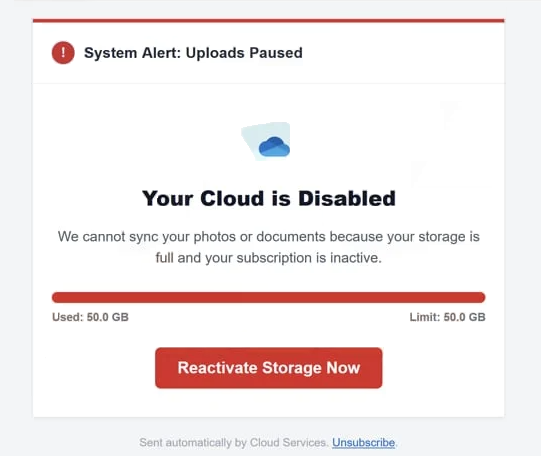
The email usually informs the recipient that their cloud storage has been disabled, uploads are paused, or file synchronization has stopped. It may also state that the storage limit has been reached or that the subscription is no longer active. To make the message more convincing, it often includes warnings that important files—such as photos, videos, or documents—could be deleted if no action is taken.
To “fix” the issue, the email provides a button or link labeled with phrases like “Reactivate Storage Now.” This link does not lead to a legitimate cloud service. Instead, it redirects users to deceptive websites that repeat the same false claims and pressure them to act quickly.
These scam websites may serve different purposes. In some cases, they attempt to trick users into entering login credentials on a fake sign-in page, allowing attackers to steal account information. In other cases, they promote paid services or products through affiliate links, earning scammers commissions when users sign up or make purchases.
A key element of this scam is urgency. The message is designed to make users believe that their data is at immediate risk, pushing them to act without verifying the claim. This tactic is common in cloud-related phishing scams, where attackers exploit fear of losing personal files to encourage quick decisions.
Falling for this scam can lead to serious consequences. Victims may unknowingly provide login credentials, enabling attackers to access their cloud accounts, personal files, and linked services. In some cases, users may also suffer financial losses if they are tricked into purchasing unnecessary services or entering payment details on fraudulent websites.
It is important to understand that legitimate cloud service providers do not send unsolicited emails asking users to restore accounts through embedded links. Any unexpected message claiming that a cloud account has been disabled should be treated with caution.
How this scam spreads and how to avoid it
The “Your Cloud Is Disabled” scam is typically distributed through mass spam email campaigns. Cybercriminals send large volumes of emails to random recipients, hoping that some will trust the message and follow the instructions.
These emails often mimic official notifications from well-known cloud platforms such as iCloud, Google Drive, or OneDrive. They may include professional formatting, logos, and technical language to appear legitimate. In some cases, they even display fake storage usage data or account details to increase credibility.
Another tactic used by scammers is domain spoofing, or the use of misleading sender addresses. The email may appear to come from a trusted company, but closer inspection often reveals slight differences in the domain name or unusual email addresses. This is a common technique used to trick users into trusting fraudulent messages.
The scam relies heavily on psychological pressure. By warning that files may be deleted or access may be lost, it encourages users to act quickly without checking whether the message is genuine. This sense of urgency is one of the most reliable indicators of a phishing attempt.
To avoid falling victim to this type of scam, users should follow a few essential precautions. One of the most important things is to avoid clicking links in unexpected emails, especially those that claim urgent account issues. Instead, users should manually visit the official website of their cloud service provider and check their account status այնտեղ.
It is also important to carefully examine the sender’s email address and look for inconsistencies. Messages from unknown or suspicious domains should be treated as fraudulent. Additionally, users should never enter login credentials or payment information on websites accessed through unsolicited links.
Enabling two-factor authentication (2FA) adds an extra layer of protection, making it more difficult for attackers to access accounts even if login details are compromised. Keeping software updated and using reliable security tools can also help detect and block phishing attempts before they cause harm.
In essence, the “Your Cloud Is Disabled” email scam is a classic example of phishing that combines fear, urgency, and deception. By staying cautious, verifying messages independently, and avoiding suspicious links, users can effectively protect their accounts and personal data from this type of threat.
Site Disclaimer
WiperSoft.com is not sponsored, affiliated, linked to or owned by malware developers or distributors that are referred to in this article. The article does NOT endorse or promote malicious programs. The intention behind it is to present useful information that will help users to detect and eliminate malware from their computer by using WiperSoft and/or the manual removal guide.
The article should only be used for educational purposes. If you follow the instructions provided in the article, you agree to be bound by this disclaimer. We do not guarantee that the article will aid you in completely removing the malware from your PC. Malicious programs are constantly developing, which is why it is not always easy or possible to clean the computer by using only the manual removal guide.