
Remove “Zoho Account Security Verification” scam email
The “Zoho – Account Security Verification” email scam is a phishing message that pretends to be an official notice from Zoho. It falsely claims that the recipient must complete a security or billing profile verification to keep their account active and compliant with updated requirements. In reality, this email is fraudulent and has no connection to Zoho or its services.
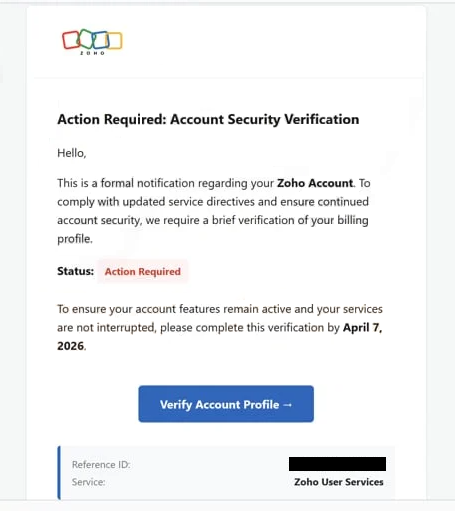
The message is designed to appear legitimate by presenting itself as an important security or compliance update. It often warns that failure to complete the verification process could result in service interruption or restricted access. To reinforce credibility, the email may include a reference ID, formal wording, and branding elements that mimic genuine Zoho communications.
Recipients are instructed to click a link, commonly labeled with something like “Verify Account Profile.” This link does not lead to Zoho’s official website. Instead, it redirects users to a fake sign-in page that imitates a legitimate login portal. The goal of this page is to capture any information entered by the user, especially email addresses and passwords.
Once attackers obtain these credentials, they can gain full access to the victim’s email account. From there, they may search for sensitive information, send phishing emails to contacts, or attempt to access other services linked to the same credentials. Because many users reuse passwords across multiple platforms, this can lead to a broader compromise affecting social media, financial accounts, or business systems.
The consequences of falling for this scam can be significant. Victims may experience account hijacking, data theft, financial loss, or identity misuse. In addition, compromised accounts are often used to distribute further scams or malicious content, extending the impact beyond the initial victim.
It is important to recognize that legitimate companies like Zoho do not request sensitive information through unsolicited email links. Messages that demand urgent verification or threaten service disruption should always be treated with caution.
How this scam spreads and how to avoid it
This scam is typically distributed through mass spam email campaigns. Cybercriminals send large volumes of these messages to random recipients, hoping that some will trust the content and follow the instructions.
To increase effectiveness, attackers use spoofed sender identities and professional-looking formatting. The email may appear to come from a Zoho support or security team, even though the actual sender address is unrelated. This technique helps create a false sense of legitimacy and encourages recipients to trust the message.
A key tactic used in this scam is urgency. By claiming that the account requires immediate verification to avoid disruption, the message pressures users into acting quickly without verifying its authenticity. This psychological approach is common in phishing campaigns and is intended to reduce critical thinking.
In some cases, users may also encounter similar scams through misleading ads or compromised websites, but email remains the primary delivery method. These campaigns often evolve, using slightly different wording or formats while maintaining the same core objective of stealing credentials.
Avoiding this type of scam requires careful attention to unexpected messages. Users should avoid clicking links in emails that request account verification or login details. Instead, if there is concern about account status, it is safer to visit the official Zoho website directly and check for notifications there.
Examining the sender’s email address is another important step. Fraudulent messages often come from domains that look similar to legitimate ones but contain subtle differences. Any inconsistency should be considered a warning sign.
Using strong, unique passwords and enabling two-factor authentication (2FA) can significantly reduce the risk of account compromise. Even if credentials are stolen, additional verification steps can prevent unauthorized access. Keeping systems updated and using reliable security tools can also help detect phishing attempts and block malicious sites.
In summary, the “Zoho – Account Security Verification” email scam relies on imitation and urgency to trick users into revealing their login credentials. By recognizing these tactics and avoiding suspicious links, users can protect their accounts and personal information from this type of phishing attack.
Site Disclaimer
WiperSoft.com is not sponsored, affiliated, linked to or owned by malware developers or distributors that are referred to in this article. The article does NOT endorse or promote malicious programs. The intention behind it is to present useful information that will help users to detect and eliminate malware from their computer by using WiperSoft and/or the manual removal guide.
The article should only be used for educational purposes. If you follow the instructions provided in the article, you agree to be bound by this disclaimer. We do not guarantee that the article will aid you in completely removing the malware from your PC. Malicious programs are constantly developing, which is why it is not always easy or possible to clean the computer by using only the manual removal guide.