
Remove “Android Has Detected A Wiretap On Your Phone” scam
The “Android has detected a wiretap on your phone” scam is a deceptive message that falsely claims a user’s mobile device has been compromised. This scam usually appears as a pop-up notification or a webpage warning that the device is under surveillance or has been infected with spyware. The message is not legitimate and is not associated with Android, Google, or any official security service. Its primary purpose is to frighten users into taking unnecessary and potentially harmful actions.
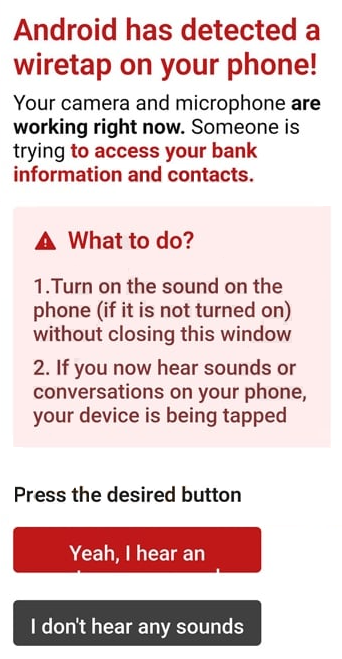
Typically, the message states that a “wiretap” or some form of unauthorized monitoring has been detected on the device. It may claim that attackers are intercepting calls, messages, or personal data. To increase credibility, the scam often includes technical-sounding language, references to security threats, or mentions of system vulnerabilities. In many cases, the warning appears urgent, suggesting that immediate action is required to prevent data theft or further damage.
To resolve the supposed issue, users are usually instructed to click a button, install an application, or follow a link. These actions do not fix any real problem because no wiretap has been detected. Instead, they often lead to malicious or unwanted outcomes. For example, users may be redirected to a page promoting a questionable application that is presented as a security tool. In reality, such apps may be adware, spyware, or other potentially unwanted programs.
In some variations of the scam, the message may direct users to download software that claims to remove the threat. Once installed, this software can display intrusive advertisements, collect personal data, or attempt to trick users into paying for unnecessary services. Other versions may redirect users to subscription-based services that charge recurring fees without providing any real benefit.
Another risk associated with this scam is phishing. Users may be taken to a webpage that asks for sensitive information such as login credentials, phone numbers, or payment details. Any information entered on such pages is likely to be collected by cybercriminals and used for fraudulent purposes, including identity theft or unauthorized transactions.
It is important to understand that legitimate operating systems like Android do not display warnings about “wiretaps” through random web pages or pop-up ads. Real security alerts are delivered through official system notifications or trusted security applications. Messages that appear unexpectedly while browsing the internet are almost always deceptive.
Although this scam does not necessarily indicate that the device is infected, interacting with it can lead to problems. Installing promoted apps, subscribing to services, or entering personal information can result in financial losses, privacy issues, or further exposure to scams. For this reason, such warnings should always be treated as fake and ignored.
How to avoid these types of scams
The “Android has detected a wiretap on your phone” scam is commonly encountered while browsing the internet on mobile devices. It is usually triggered by untrustworthy websites, aggressive advertisements, or redirect chains. Users may land on these pages after clicking misleading ads, visiting illegal streaming sites, or interacting with suspicious content online.
Many of these scam messages are delivered through advertising networks that allow malicious actors to display deceptive content. Even legitimate websites can sometimes show such ads if their advertising networks are compromised or poorly moderated. As a result, users may encounter these warnings without intentionally visiting harmful websites.
Another common cause is the presence of adware or potentially unwanted applications installed on the device. These programs can generate intrusive advertisements and redirect users to scam pages automatically. If a user frequently encounters such warnings, it may indicate that an unwanted app is installed on the device.
The scam relies heavily on fear and urgency. By claiming that the device is being monitored or compromised, it pressures users into acting quickly without verifying the legitimacy of the message. This psychological tactic increases the likelihood that users will click on links or download recommended applications.
Avoiding this type of scam requires careful browsing habits and awareness of how such threats operate. One of the most important steps is to ignore and close suspicious pop-ups immediately. Users should not interact with the message, click any buttons, or download any suggested software.
If a webpage displays such a warning and cannot be easily closed, users can exit the browser or force-stop it through the device’s settings. Clearing the browser’s cache and data may also help prevent the page from reappearing.
It is also advisable to download applications only from official sources such as the Google Play Store. Even then, users should review app ratings, permissions, and developer information before installing any application. Avoiding third-party app stores significantly reduces the risk of installing malicious or unwanted software.
Keeping the device’s operating system and applications updated is another important precaution. Updates often include security improvements that help protect against malicious websites and apps. Additionally, using a reputable mobile security application can provide an extra layer of protection by detecting suspicious activity and blocking harmful content.
Users should remain cautious when browsing unfamiliar websites or clicking on advertisements, especially those that promise security alerts, prizes, or urgent warnings. Legitimate security notifications will not appear as random web pages demanding immediate action.
In summary, the “Android has detected a wiretap on your phone” scam is a fear-based deception designed to manipulate users into installing unwanted software or revealing sensitive information. By understanding how these scams appear and avoiding interaction with suspicious messages, users can effectively protect their devices and personal data.
Site Disclaimer
WiperSoft.com is not sponsored, affiliated, linked to or owned by malware developers or distributors that are referred to in this article. The article does NOT endorse or promote malicious programs. The intention behind it is to present useful information that will help users to detect and eliminate malware from their computer by using WiperSoft and/or the manual removal guide.
The article should only be used for educational purposes. If you follow the instructions provided in the article, you agree to be bound by this disclaimer. We do not guarantee that the article will aid you in completely removing the malware from your PC. Malicious programs are constantly developing, which is why it is not always easy or possible to clean the computer by using only the manual removal guide.