
Remove “iCloud – update your payment method” phishing email
The “iCloud – update your payment method” email scam is a phishing campaign that impersonates a legitimate notification from Apple’s iCloud service. The message is designed to convince recipients that their iCloud account has encountered a payment problem and requires immediate action. In reality, the email is fraudulent and has no connection to Apple or its official services. The main goal of the scam is to trick recipients into revealing sensitive information such as login credentials or financial details.
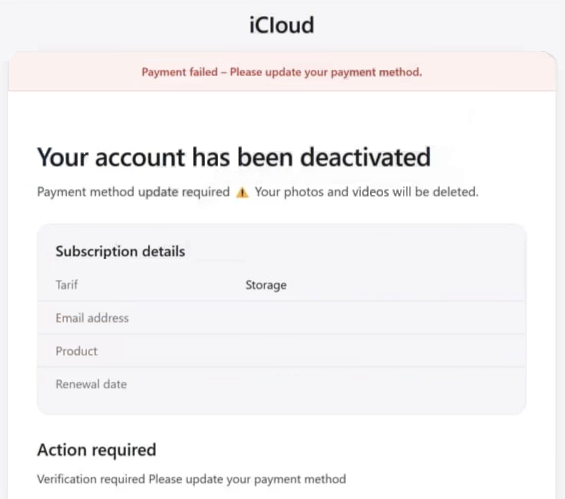
The scam email typically claims that the recipient’s iCloud account has been deactivated or suspended due to a failed payment. It may state that the account’s subscription renewal could not be processed and warn that important data—such as photos, videos, or stored files—could be deleted if the payment issue is not resolved. These warnings are used to create urgency and pressure the recipient into taking immediate action.
To resolve the supposed problem, the email usually includes a button or link labeled something like “Update payment method.” Recipients are encouraged to click the link and follow instructions to restore their account. However, the link does not lead to Apple’s official website. Instead, it typically directs users to a malicious or fraudulent webpage that is designed to resemble a legitimate iCloud login page.
Once victims reach the fake website, they may be asked to enter their Apple ID credentials, including their email address and password. Some versions of the scam also request additional information such as credit card details, billing addresses, or other personal data. Any information entered on the fraudulent site is transmitted directly to the attackers behind the scam.
The stolen data can then be used for a variety of malicious purposes. For example, cybercriminals may use the captured login credentials to hijack the victim’s iCloud account. Access to such accounts can expose private files, contacts, photos, and other personal information. Attackers may also attempt to reset passwords for other services connected to the same email address.
Financial information collected through these phishing pages can be used to perform unauthorized purchases or other fraudulent transactions. In addition, compromised accounts can be used to distribute spam, send phishing emails to contacts, or spread malware. As a result, victims of this scam may experience financial losses, identity theft, or privacy violations.
It is important to understand that legitimate companies like Apple do not ask users to update payment information through unsolicited email links. Official notifications about account issues typically direct users to log in through the company’s official website or app rather than asking them to submit sensitive information through external links.
How this phishing scam spreads and how to avoid it
The “iCloud – update your payment method” scam is distributed primarily through spam email campaigns. Cybercriminals use automated tools to send large volumes of deceptive messages to thousands or even millions of email addresses. These campaigns rely on the assumption that at least some recipients will believe the message and follow the provided instructions.
Scammers often attempt to make the emails appear convincing. They may include Apple branding, official-looking formatting, and detailed subscription information such as a product name, storage plan, or renewal date. These details are meant to give the impression that the message is a genuine account notification.
Another common tactic used in phishing campaigns is the creation of a sense of urgency. The email may warn that the account will be permanently deactivated on a specific date or that stored data will be deleted if the payment information is not updated immediately. Such warnings are intended to pressure recipients into acting quickly without carefully examining the legitimacy of the message.
In addition to deceptive emails, scammers may use other distribution methods to promote similar phishing schemes. These can include malicious advertisements, misleading pop-ups, search engine manipulation techniques, and fake websites that imitate legitimate services. These tactics help attackers reach a larger number of potential victims and increase the chances of someone falling for the scam.
Avoiding phishing scams requires careful attention to unexpected messages. One of the most effective precautions is to verify the sender and examine the email carefully. Messages that create urgency, request sensitive information, or contain suspicious links should be treated with caution. Even if an email appears to come from a trusted company, the sender’s address may reveal that it originates from an unrelated or misspelled domain.
Users should also avoid clicking links in unexpected emails that claim to require immediate action. If a message appears to be from a service like iCloud, the safest approach is to open a browser and visit the official website directly rather than using the link provided in the email. This ensures that any login attempt occurs on a legitimate site.
Maintaining good cybersecurity practices can also reduce the risk of phishing attacks. Keeping software updated, using reliable security tools, and enabling two-factor authentication for important accounts can help prevent unauthorized access even if login credentials are compromised.
Ultimately, the “iCloud – update your payment method” email scam relies on deception and urgency to succeed. By recognizing the warning signs of phishing messages and avoiding suspicious links or requests for personal data, users can significantly reduce the risk of becoming victims of this type of online fraud.
Site Disclaimer
WiperSoft.com is not sponsored, affiliated, linked to or owned by malware developers or distributors that are referred to in this article. The article does NOT endorse or promote malicious programs. The intention behind it is to present useful information that will help users to detect and eliminate malware from their computer by using WiperSoft and/or the manual removal guide.
The article should only be used for educational purposes. If you follow the instructions provided in the article, you agree to be bound by this disclaimer. We do not guarantee that the article will aid you in completely removing the malware from your PC. Malicious programs are constantly developing, which is why it is not always easy or possible to clean the computer by using only the manual removal guide.