
Remove “Microsoft Anti-Xploit Guard Released a Security Update” phishing email
The “Microsoft Anti-Xploit Guard Released a Security Update” email scam is a phishing campaign designed to trick recipients into believing that Microsoft has released an urgent security update that they must install immediately. The message attempts to create a sense of urgency by claiming that the update is necessary to protect the recipient’s computer from newly discovered vulnerabilities or threats. In reality, the email is fraudulent and is not associated with Microsoft or any legitimate cybersecurity service.
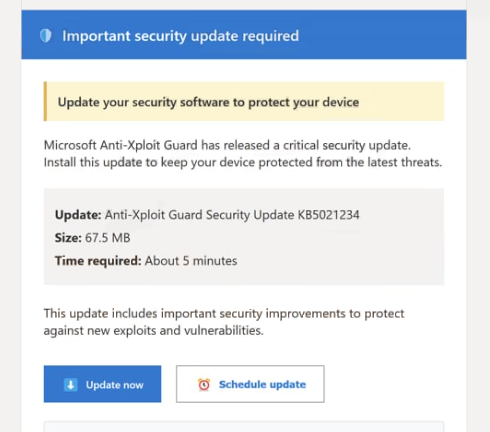
These emails typically appear to come from a security or support department and may contain subject lines referencing security alerts, vulnerability fixes, or urgent protection updates. The message often claims that Microsoft Anti-Xploit Guard has released a critical patch to address recent security issues affecting Windows systems. Recipients are instructed to follow a provided link or download an attached file in order to install the supposed update.
However, the provided link does not lead to a legitimate Microsoft website. Instead, it usually redirects the victim to a malicious or deceptive webpage designed to download harmful software or collect sensitive information. In some cases, the page may display instructions encouraging the user to download a file that is presented as a security patch. This file may actually contain malware, such as a trojan, spyware, or another type of malicious program.
In other variations of the scam, the link may lead to a phishing page that mimics the appearance of a legitimate Microsoft login portal. Victims may be asked to enter account credentials, email addresses, or other personal details in order to verify their identity before accessing the supposed update. Once this information is submitted, it is sent directly to the scammers, who can then use it for identity theft, account hijacking, or further cyberattacks.
Cybercriminals often design these messages to look convincing. The email may include Microsoft branding, professional formatting, and language that appears technical or authoritative. Some versions even include references to well-known security technologies or features to make the message seem legitimate. Despite these tactics, Microsoft does not distribute security updates through unsolicited emails containing direct download links.
Another goal of such phishing campaigns is to install malware on the victim’s system. If a user downloads and opens the file attached to the email or provided on the linked page, the malware may begin running immediately. Depending on the type of malicious program delivered, it could allow attackers to monitor activity, steal stored credentials, log keystrokes, or grant remote access to the compromised device.
The consequences of interacting with phishing emails can be significant. Victims may experience data theft, financial losses, unauthorized access to accounts, or infections that compromise the security of their entire system. For this reason, cybersecurity experts strongly advise treating unexpected security-related emails with caution, especially those that encourage immediate action or downloads.
How these phishing emails spread and how to avoid them
Phishing campaigns like the “Microsoft Anti-Xploit Guard Released a Security Update” scam are usually distributed through mass spam email campaigns. Cybercriminals use automated tools to send large numbers of emails to potential victims around the world. The messages may target both individuals and businesses, relying on the fact that some recipients will trust the message and follow its instructions.
These campaigns frequently use spoofed email addresses that appear to belong to legitimate organizations. Attackers may modify the sender address so that it resembles an official Microsoft domain or another trusted source. In some cases, the displayed sender name may say “Microsoft Security” or something similar, even though the actual email address is unrelated to Microsoft.
The emails are also crafted to create a sense of urgency or fear. They often claim that the user’s system is vulnerable, that their account has been compromised, or that immediate action is required to avoid security risks. This psychological pressure encourages recipients to click links or download files without carefully verifying the legitimacy of the message.
Attachments included in phishing emails may contain malicious files disguised as security updates or important documents. These attachments can appear in several formats, including executable files, compressed archives, or documents containing malicious macros. Once opened, the file may install malware that operates silently in the background.
In some cases, clicking the link in the email will redirect users through several intermediary websites before reaching the final malicious page. This technique helps attackers bypass security filters and makes it more difficult for victims to recognize the fraudulent nature of the link.
Avoiding phishing scams requires a combination of awareness and cautious online behavior. One of the most effective strategies is to carefully examine the sender’s email address and verify whether it actually belongs to the organization it claims to represent. If the domain name looks unusual or unfamiliar, the message is likely fraudulent.
Users should also be skeptical of emails that request sensitive information, encourage urgent downloads, or contain suspicious attachments. Legitimate companies typically distribute software updates through official update systems or trusted websites rather than through unsolicited emails.
Another important safety practice is to avoid clicking links directly within unexpected emails. If a message claims to be from a well-known company, it is safer to visit the company’s official website manually and check for updates or announcements there. This helps ensure that any downloads come from legitimate sources.
Using reliable security software and keeping operating systems and browsers updated can also help detect and block malicious downloads or phishing pages. Many modern security tools include phishing protection that warns users when they attempt to access known scam websites.
Ultimately, scams like the “Microsoft Anti-Xploit Guard Released a Security Update” email rely on deception and urgency to succeed. By remaining cautious, verifying the authenticity of messages, and avoiding suspicious downloads or links, users can significantly reduce the risk of falling victim to these types of phishing attacks.
Site Disclaimer
WiperSoft.com is not sponsored, affiliated, linked to or owned by malware developers or distributors that are referred to in this article. The article does NOT endorse or promote malicious programs. The intention behind it is to present useful information that will help users to detect and eliminate malware from their computer by using WiperSoft and/or the manual removal guide.
The article should only be used for educational purposes. If you follow the instructions provided in the article, you agree to be bound by this disclaimer. We do not guarantee that the article will aid you in completely removing the malware from your PC. Malicious programs are constantly developing, which is why it is not always easy or possible to clean the computer by using only the manual removal guide.