
Remove My Coupons Online browser hijacker
My Coupons Online is a browser hijacker disguised as a shopping and coupon extension. It claims to help users find discounts, promotional offers, and online deals while browsing. Although these features may sound useful, the extension primarily serves to modify browser settings and promote a specific search engine, rather than improve the shopping experience.
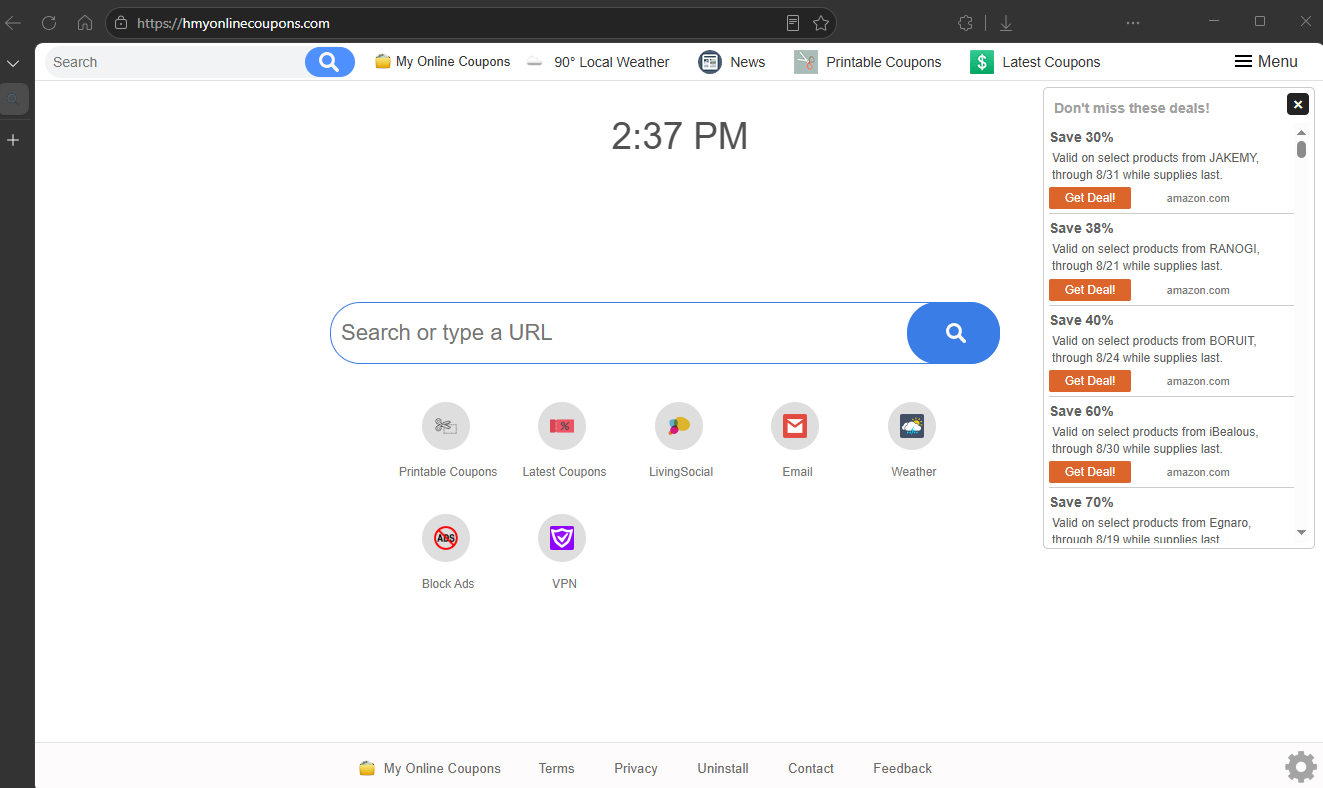
After installation, My Coupons Online typically changes the browser’s homepage, new tab page, and default search engine without providing a straightforward way to restore the previous settings. As a result, searches entered into the address bar are routed through a promoted search service instead of the user’s preferred provider. These modifications are intended to increase traffic to affiliated websites and generate advertising revenue.
The search engine promoted by My Coupons Online generally does not perform its own web indexing. Instead, it forwards search requests to another search provider after processing them through its own infrastructure. This allows the operators to insert sponsored content, collect browsing data, or redirect users through additional domains before legitimate search results are displayed.
Beyond altering browser settings, the extension may also monitor browsing activity. Browser hijackers frequently collect information such as search queries, visited websites, clicked advertisements, browser type, IP address, and approximate location. Depending on the software’s privacy policy, this information may be used for advertising purposes or shared with business partners, creating privacy concerns for affected users.
Users may also notice other unwanted changes while the extension remains installed. Browsing can become slower, unexpected redirects may occur, and advertisements may appear more frequently than before. Some promoted links may lead to unreliable websites containing deceptive offers, fake giveaways, technical support scams, or downloads for other potentially unwanted applications.
Although My Coupons Online is not considered destructive malware such as ransomware or a banking trojan, it still reduces browser security and user control. Because it modifies browser behavior for commercial purposes and may expose users to additional online threats, it is classified as a potentially unwanted program (PUP) and is generally not recommended for use.
How My Coupons Online gets installed and how to avoid it
My Coupons Online is commonly distributed through multiple deceptive installation methods. While it may be available as a standalone browser extension, many users encounter it after installing unrelated free software downloaded from third-party websites.
A common distribution technique is software bundling. Free applications obtained from unofficial download portals may include optional browser extensions or other additional software within the installer. These offers are often pre-selected or disclosed only in less noticeable parts of the installation process. Users who proceed using default installation settings may unintentionally authorize the installation of My Coupons Online along with the desired program.
The extension may also be promoted through misleading advertisements that promise coupon finders, cashback opportunities, shopping assistants, or browser improvements. Such advertisements frequently appear on low-quality websites and attempt to convince users that the extension will save money or improve online shopping, while failing to clearly disclose its browser-modifying behavior.
In some situations, redirects to promotional pages may originate from adware already installed on the computer. Users may repeatedly encounter advertisements encouraging them to install shopping-related extensions, increasing the likelihood of downloading unwanted software.
To reduce the risk of installing browser hijackers like My Coupons Online, software should always be downloaded from official developer websites or reputable application stores. During installation, choosing Advanced or Custom setup options allows users to review all bundled components and decline anything unrelated to the software they intended to install.
Users should also carefully examine browser extensions before installing them. Reading reviews, checking the requested permissions, and verifying the developer can help identify extensions that request excessive access to browsing activity or browser settings.
Regularly reviewing installed extensions is another good security practice. Any extension that was installed unexpectedly or that changes browser behavior without a clear reason should be removed. Keeping the browser, operating system, and security software fully updated also helps reduce the likelihood of unwanted software remaining active.
Remove My Coupons Online browser hijacker
It’s a good idea to use an anti-virus program like WiperSoft to remove My Coupons Online browser hijacker, because while it’s not a dangerous infection, it can still be difficult to remove manually.
Site Disclaimer
WiperSoft.com is not sponsored, affiliated, linked to or owned by malware developers or distributors that are referred to in this article. The article does NOT endorse or promote malicious programs. The intention behind it is to present useful information that will help users to detect and eliminate malware from their computer by using WiperSoft and/or the manual removal guide.
The article should only be used for educational purposes. If you follow the instructions provided in the article, you agree to be bound by this disclaimer. We do not guarantee that the article will aid you in completely removing the malware from your PC. Malicious programs are constantly developing, which is why it is not always easy or possible to clean the computer by using only the manual removal guide.