
Remove “Security Verification – Confirm You’re Not A Robot” email scam
The “Security Verification – Confirm You’re Not A Robot” email scam is a phishing campaign designed to trick recipients into revealing sensitive information or interacting with malicious websites. The message falsely claims that unusual activity has been detected on the recipient’s email account or online profile and that a verification process is required to confirm they are a real user. In reality, the email is fraudulent and has no connection to any legitimate company or service provider.
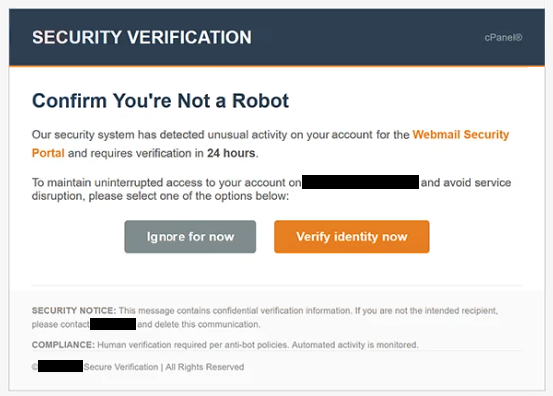
The email is crafted to look like a genuine security alert. It often uses professional formatting, warning symbols, and urgent language to make the message appear authentic. Recipients are typically informed that suspicious login attempts, spam activity, or automated behavior has been detected and that failure to complete verification could lead to account restrictions or suspension.
To complete the supposed verification, users are instructed to click a button or link labeled with phrases such as “Verify Now” or “Confirm You’re Not A Robot.” This link does not lead to a legitimate verification page. Instead, it redirects users to a fraudulent website designed to imitate a login portal or CAPTCHA verification page.
Once on the fake page, victims may be asked to enter their email credentials, passwords, or other personal information. In some cases, the page may also request phone numbers, payment details, or multi-factor authentication codes. Any information entered is sent directly to the scammers behind the campaign.
The consequences of interacting with these phishing pages can be serious. Attackers who gain access to email accounts may search for sensitive information, reset passwords for connected services, or use the compromised account to send additional phishing emails. This can lead to identity theft, financial fraud, privacy breaches, or unauthorized access to other accounts.
Some versions of the scam may also expose users to malware. Clicking suspicious links or downloading attached files can result in the installation of malicious software, including trojans, spyware, or ransomware. This expands the threat beyond credential theft and can compromise the entire system.
It is important to understand that legitimate companies do not ask users to confirm they are “not a robot” through unsolicited email links. Real verification processes are usually performed directly through official websites or applications, not through unexpected messages.
How this scam spreads and how to avoid it
The “Security Verification – Confirm You’re Not A Robot” scam is mainly distributed through mass spam email campaigns. Cybercriminals send large volumes of emails to random recipients, hoping that some users will trust the warning and follow the provided instructions.
To make the emails appear more convincing, scammers frequently use spoofed sender addresses and branding elements that imitate trusted companies or service providers. The email may appear to come from a security team, support department, or automated protection system, even though the sender has no connection to the claimed organization.
A key tactic used in this campaign is creating urgency and fear. By claiming that suspicious activity has been detected or that the account could be suspended, the message pressures recipients into acting quickly without carefully checking the legitimacy of the email. This psychological manipulation is one of the most common characteristics of phishing attacks.
Some phishing campaigns also rely on deceptive websites that closely imitate real login pages. These pages may include fake CAPTCHA tests, loading animations, or verification prompts to make them appear authentic. Because of this, users may not immediately realize that they are interacting with a fraudulent site.
Avoiding this type of scam requires a cautious approach to unexpected emails. Users should avoid clicking links or downloading attachments from unsolicited messages, especially those demanding urgent action or account verification. If there is concern about account security, it is safer to visit the official website directly by typing the address into a browser instead of using links provided in emails.
Carefully checking the sender’s email address can also help identify phishing attempts. Fraudulent messages often come from suspicious or misspelled domains that only resemble legitimate companies.
Enabling two-factor authentication (2FA) on important accounts provides additional protection, even if login credentials are stolen. Using strong, unique passwords for different accounts further reduces the impact of credential theft.
Keeping operating systems, browsers, and security software updated can help block malicious websites and detect phishing attempts before they cause harm. Security awareness and skepticism toward unexpected messages remain some of the most effective defenses.
Site Disclaimer
WiperSoft.com is not sponsored, affiliated, linked to or owned by malware developers or distributors that are referred to in this article. The article does NOT endorse or promote malicious programs. The intention behind it is to present useful information that will help users to detect and eliminate malware from their computer by using WiperSoft and/or the manual removal guide.
The article should only be used for educational purposes. If you follow the instructions provided in the article, you agree to be bound by this disclaimer. We do not guarantee that the article will aid you in completely removing the malware from your PC. Malicious programs are constantly developing, which is why it is not always easy or possible to clean the computer by using only the manual removal guide.